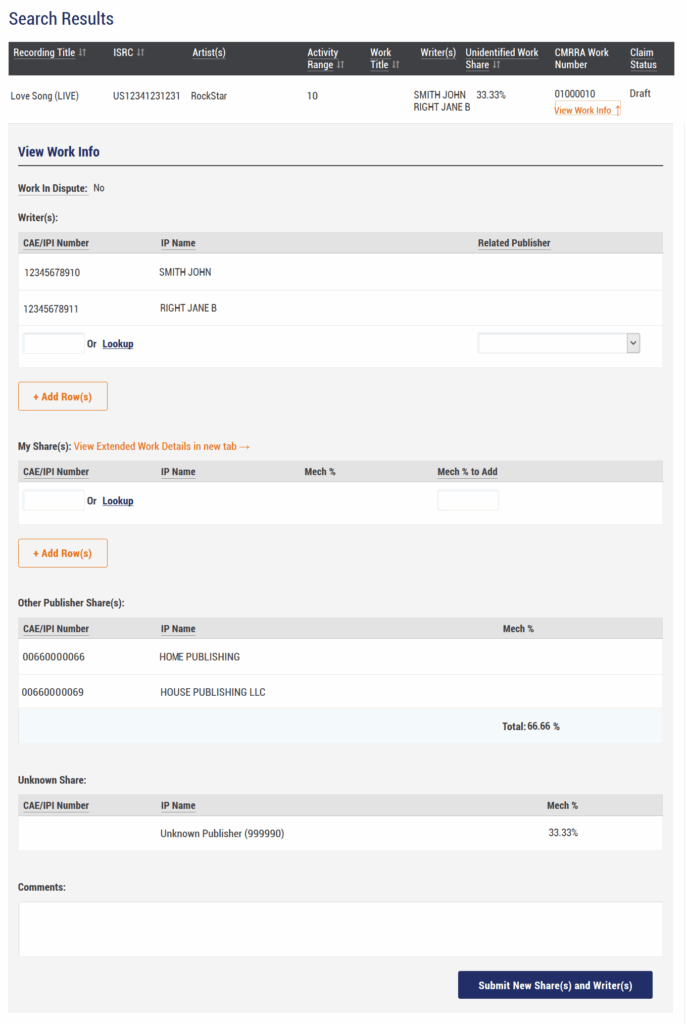
For matched recordings that display the ‘View Work Info’ icon, click to expand this section to view details of the musical work, laid out as follows:
- Dispute status
- Writer(s)
- My share(s) – Your already registered share(s), if any – This is where you would add your claim if not already provided
- Other publishers associated with the work, and their combined ownership claims
- Unknown share percentage
In the example below, the recording is linked to a Work with an unknown share of 33.33%. The screen provides the capacity to add additional writers and publisher catalogues that you control, in the appropriate section. You can do so by adding an IPI number directly into the input box or by using the Lookup tool for other search parameters.
Newly added writers can be linked to the correct publisher via the Related Publisher dropdown. To provide a publisher link for a writer that exists on the work already, simply add the writer name again with the correct related publisher. This is important for us to validate claims and update our records with this information. We cannot process claims without a Writer/Publisher link.
Input the ownership share that you wish to register in the ‘Mech % to Add’ field on the newly added publisher row. There is a Comment box for any additional information that you might wish to include.
Once you have added the necessary details, click the ‘Submit New Share(s) and Writer(s)’ button to submit your claim. A Draft claim status will appear next to the record.
 #
#
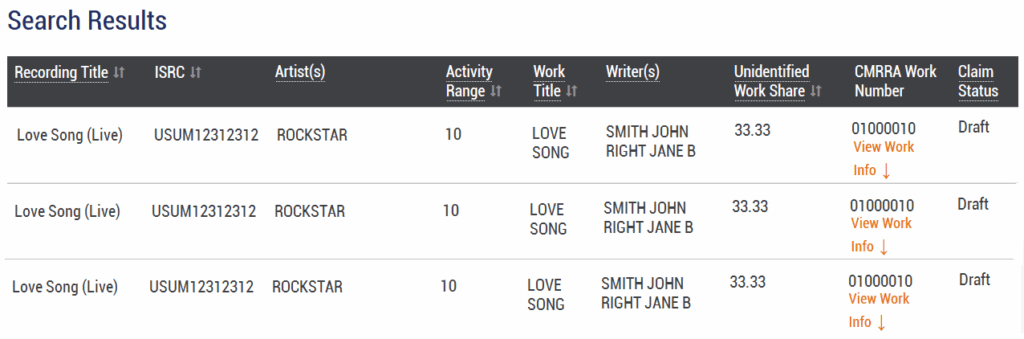
Multiple Recordings Already Linked #
Note that providing a share claim against a work will automatically generate draft claims against any other recording that is also linked to that work. Pressing the Search button again will refresh the screen to surface these additional Draft claims.